
Course / Level 0 · Reachable / Step 1
Level 0 · Reachable
Transport security
HTTPS everywhere, a valid certificate, and TLS 1.2 or better — the non-negotiable entry condition for any agent traffic.
In this lesson
Level 0 is the floor the whole OARS ladder stands on. This first lesson gets transport security right, so nothing you build above it sits on sand.
- Confirm your site is served over HTTPS with a valid, current certificate
- Force every HTTP request to redirect to HTTPS
- Require TLS 1.2 or better, then turn on HSTS
- Verify the result the way an agent would — and prove it with the scanner
Why this comes first
A person who hits a certificate warning can shrug and click “proceed anyway.” An agent can’t. There’s no one there to click.
So when an agent meets an expired certificate, a downgraded connection, or a plain-HTTP endpoint, it does the safe thing: it stops. It treats your site as unreachable and moves on to the next option.
That’s the whole reason this is Level 0. Every clever thing you do at Levels 1 through 5 is invisible if an agent can’t open a secure connection in the first place.
Note
Level 0 is deliberately unglamorous. It’s the operational hygiene a modern site already needs — just made explicit, so the agent-specific work above it has something solid to stand on.
The whole job is three moves: see where you stand, force HTTPS everywhere, then require modern TLS and turn on HSTS. We’ll take them one at a time.
Step 1 — See where you stand
Don’t change anything yet. First, look at your site the way an agent would.
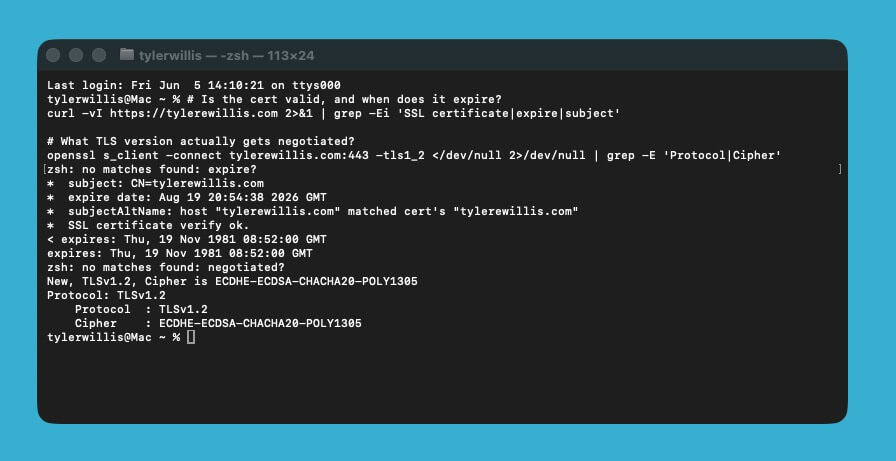
Two quick commands tell you almost everything. The first checks the certificate. The second shows which TLS version actually gets negotiated.
# Is the cert valid, and when does it expire?
curl -vI https://yourdomain.com 2>&1 | grep -Ei 'SSL certificate|expire|subject'

# What TLS version actually gets negotiated?
openssl s_client -connect yourdomain.com:443 -tls1_2 </dev/null 2>/dev/null | grep -E 'Protocol|Cipher'
A healthy site shows a valid certificate with an expiry comfortably in the future, and a negotiated protocol of TLS 1.2 or 1.3. Anything else is a finding.
Step 2 — Force HTTPS everywhere
Here’s the problem. If any address on your site still answers on plain http:// — no “s” — that’s an open door. A visitor or an agent can arrive over an unencrypted connection, and anything sent that way can be read or tampered with in transit.
The fix is simple: every http:// request should be sent straight to its secure https:// twin, automatically, every time. That automatic hop is called a redirect.
Three things separate a good redirect from a sloppy one:
- Put it as close to the front door as possible — wherever requests first reach your site. Usually that’s your web server (nginx or Apache), or a service sitting in front of it like Cloudflare or a load balancer.
- Make it a 301 — the status code that means “moved permanently.” Browsers and agents remember a 301, so they stop asking for the insecure version altogether. (A 302 means “temporary” and won’t stick.)
- Keep the path. A request for
/pricingshould land on/pricing, not the homepage. And pick one canonical host —wwwor no-www— then be consistent.
How you set this up depends on what runs your site. The two most common are nginx and Apache, so here’s both.
If you’re on nginx (common on VPS and cloud servers), a small block listens on the insecure port and bounces everything to HTTPS:
# nginx — redirect all HTTP to HTTPS
server {
    listen 80;
    server_name yourdomain.com www.yourdomain.com;
    return 301 https://yourdomain.com$request_uri;
}
If you’re on Apache — what most shared and cPanel hosting runs — the rules go in a file called .htaccess at the root of your site. Create it if it isn’t already there:
# .htaccess — redirect all HTTP to HTTPS
RewriteEngine On
RewriteCond %{HTTPS} off
RewriteRule ^ https://%{HTTP_HOST}%{REQUEST_URI} [L,R=301]
And if you never touch server files at all — on Cloudflare, Vercel, Netlify, Shopify, Squarespace, or managed WordPress — this is almost always a single switch in the dashboard. Look for a setting named something like “Always use HTTPS” and turn it on.
Note
No certificate yet? You don’t need to buy one. Let’s Encrypt issues them free — most managed hosts enable it with a single click, and on your own server Certbot automates the whole thing (sudo certbot --nginx or sudo certbot --apache) and renews it for you.
Whichever route you take, one detail is easy to get wrong.
Watch out
Redirect to the same path, not the homepage. Sending /pricing to / on the HTTPS hop quietly breaks deep links — and any agent following a sitemap entry lands in the wrong place.
Step 3 — Require modern TLS, then turn on HSTS
Two finishing touches. A quick word on what each one is, first — they sound scarier than they are.
TLS is the encryption behind the “s” in https. It comes in versions, and the old ones — TLS 1.0 and 1.1 — have known weaknesses. You want to accept only 1.2 and 1.3, so a connection can’t be quietly talked down to something breakable.
HSTS is a header — a short instruction your site sends along with every response. It tells the browser or agent, in effect: “from now on, only ever reach me over HTTPS.” After the first visit they won’t even try plain HTTP, which closes the tiny gap that exists before your redirect can run.
On nginx, both live in your SSL config — one line sets the allowed versions, one sends the header:
# nginx — modern TLS + HSTS
ssl_protocols TLSv1.2 TLSv1.3;
add_header Strict-Transport-Security "max-age=31536000; includeSubDomains" always;
On Apache, the HSTS header can go right in that same .htaccess file from Step 2:
# .htaccess — HSTS header
Header always set Strict-Transport-Security "max-age=31536000; includeSubDomains"
The TLS-version setting is a bit different. It’s controlled at the server level — Apache’s SSLProtocol directive — not in .htaccess. On shared or managed hosting you usually can’t change it, and you don’t need to: the host keeps modern TLS switched on for you. The part that’s yours to add is the HSTS header above.
One setting here can bite you if you rush it.
Common mistake
Don’t add preload to your HSTS header until you’re certain every subdomain can serve HTTPS, forever. Preload is hard to undo, and it will take down any subdomain that can’t.
That is the one real footgun. The flip side is an easy win you can offer at the same time.
Pro / agency note
While you’re in here, do a quick scan for mixed-content warnings. A site that’s “on HTTPS” but still loads one http:// script is a common gap — and a fast one to close.
With all three changes live, do not assume they took. Check the result the way an agent would.
Verify it worked
Re-run the checks from Step 1. The certificate should be valid, TLS should negotiate at 1.2 or 1.3, and http:// should 301 to https:// on the same path.
Then confirm the HSTS header is actually being sent:
curl -sI https://yourdomain.com | grep -i strict-transport-securityValid certificate, forced HTTPS, modern TLS with HSTS — that is the transport layer an agent needs before it will trust a single byte from your site.
Recap
- Agents fail closed on bad transport — an invalid cert means “unreachable.”
- Redirect all HTTP to HTTPS with a 301, preserving the path.
- Require TLS 1.2+ and add HSTS (skip preload until you’re sure).
- Verify the way an agent would, then confirm with the OARS scanner.
Resources
- knov.ai — OARS Standard · Level 0 (Reachable) — the official spec section for this level, with the exact, testable requirements this lesson maps to
- SSL Labs Server Test — grade your certificate, protocol, and cipher setup end to end
- Mozilla SSL Configuration Generator — copy-paste modern nginx, Apache, and other server TLS configs
- MDN — Strict-Transport-Security (HSTS) — reference for the HSTS header, its directives, and the preload list
- Let’s Encrypt — free certificates via Certbot — issue and auto-renew a free TLS certificate if you don’t have one yet
Your site now meets an agent at the door with a connection it can trust: a valid identity, an encrypted channel, and no insecure path left open. That is the non-negotiable floor — nothing further in OARS counts if an agent can’t even establish a safe connection. Next, we make sure agents can stay connected long enough to actually use you — availability and performance.